
Go2Clock - Updates
Your Go2Clock Update Information
The ClockRite team are constantly looking to update and develop the system to increase functionality and fix bugs. Please find the updates released below.
We recommend bookmarking this page for easy access in the future. This guide is also viewable on a tablet or mobile.
October 2026
Mobile Clocking – Geofencing
You can now decide how the geolocation is used for users clocking in via mobile. This is set company-wide within System Settings → System Config Settings → Employee Dashboard.
- When 'Disable location services for mobile clocking' is enabled, the user's location isn't recorded and geofencing is ignored.
- When location services are enabled and geofencing is OFF: Employees can clock in or out from anywhere, provided their device can obtain a valid GPS location.
- When location services are enabled and geofencing is ON: Employees can only clock in or out when they are at an approved location.

Key Benefits
- Don't capture locations when sites need to remain confidential
- Restrict clockings to only within approved locations
Holiday & Sick – Appointment Leave
We have added Appointment Leave, allowing paid absences to be recorded without affecting an employee's holiday entitlement or sickness score. This is ideal for medical appointments or training courses, where the employee needs to be paid but is unable to clock in or out at a terminal. Appointment Leave is applied as a rule to your existing Holiday & Sick leave types. Once enabled, the recorded hours are calculated as standard hours rather than holiday or sickness hours.

Key Benefits
- Record paid absences without reducing holiday entitlement.
- Sickness scores are not affected by appointments or training.
- Works with your existing Holiday & Sick leave types.
Clock Editing – Recalculate Button
We have made editing clock records quicker. Previously, adding a clock record would recalculate the totals and reload the report straight away, which slowed things down when adding several entries. Totals are now only recalculated when the Recalculate button is selected, so you can add all the clock records you need and update the totals once.

Key Benefits
- Add multiple clock records without waiting for the report to reload each time.
- Recalculate the totals once, when you are ready.
- Clock edits can be worked through more smoothly.
Recruitment – New Module
We have released a new recruitment module, available as a paid add-on. You can create recruitment posts, set the requirements for each role and build questionnaires for applicants, which can then be attached to job adverts. The module supports full-time, part-time and temporary positions, keeping applications organised in one place.

Key Benefits
- Create recruitment posts and set role requirements.
- Build applicant questionnaires and attach them to job adverts.
- Manage full-time, part-time and temporary recruitment in one place.
September 2026
Visitor Management – New Module
We have released a new Visitor Management module, replacing the paper visitor book with a self-service kiosk. The kiosk runs in a web browser on any tablet or laptop, so there is no specialist hardware to buy and nothing for visitors to download. Visitors enter their details, choose a visit type (visitor, contractor, delivery or interview), agree to your site policies and select who they are visiting. Their host is emailed as soon as they check in, and the visitor receives a checkout code by email to use when they leave.
Checked-in visitors appear on a live list alongside your staff and are included on the fire roll call until they check out. Every visit is stored in a searchable visitor log.


Key Benefits
- Unlimited kiosks, each with its own sign-in steps per site.
- Site rules and policies are read and agreed upon before entry and can be updated at any time.
- Hosts are emailed automatically when their visitor arrives.
- Visitors are included on the live fire roll call, so marshals can account for everyone.
- Visitor badges can be printed, and every visit is kept in a searchable log.
User Interface – Visual Improvements
We have made a number of visual improvements to give the system a more consistent, modern look. Selectable options throughout the system now use the same colour scheme, and the tab you are currently on is highlighted in light grey in the left-hand sidebar. No setup is required.


Key Benefits
- A consistent colour scheme across all selectable options.
- The current tab is easy to identify thanks to the sidebar highlight.
- A cleaner interface that is easier to find your way around.
Sidebar – Independent Scrolling
The left-hand sidebar can now be scrolled separately from the main page. Previously the sidebar was fixed, so reaching options such as System Settings could mean scrolling to the bottom of the page. Simply hover over the sidebar and use the mouse wheel to reach any option.
Key Benefits
- Reach any menu option without scrolling the main page.
- Move between sections of the system more quickly.
- Easier navigation on long pages and smaller screens.
Shift Rules – Arrive Late Threshold
We have added an 'Arrive Late' rule within Shift Rules, allowing you to set your own late arrival threshold. Previously, the Legacy and Tardy reports used a fixed three-minute grace period that could not be changed. Employees who clock in after their scheduled start time but within the threshold are marked as on time and are only marked as late once the threshold has been exceeded.

Key Benefits
- Set a late arrival allowance that matches your company's lateness policy.
- Replaces the fixed three-minute grace period.
- Employees are only marked late once the threshold is exceeded.
Messaging – Send Messages to Employees
You can now send messages to employees from within the system. This can be used to share updates such as site changes, annual closure reminders and other announcements.
Super Admins can message individual employees, specific departments or the whole company. The ability to message the whole company or an entire department can be enabled/disabled per user role.

Key Benefits
- Share important information with staff directly from the system.
- Send to individuals, departments or the whole company.
August 2026
Clock Devices – Biometric Sync
We have updated the clock devices' communication to support facial, fingerprint and palm sync. You can set which biometric types you want to sync per device under System Settings → Time Clock Devices → Update Device → Biometric Template Types

Key Benefits
- Register at a single device and sync biometrics across all sites.
- Sync only the information you want.
Employee Screen – Send to Device
We have added the option to upload an employee to the clock devices from within the employees list.
Within the employee list, click on 'Send to Clock Device'; a popup will then open where you can select which devices you want to upload the employee to. Click 'Send User' and the employee will be uploaded along with any biometrics stored within G2C
This function can be enabled by role under System Settings → System Config Settings → Customise Roles.

Key Benefits
- Sending a single user is faster, meaning you can go and register biometrics straight away.
- You can send users to multiple devices at the same time.
Legacy Timesheet – Save Editable Totals
We have added the ability to save changes made to the totals within the Legacy Report v6-Beta. Previously, any adjustments to the totals were lost once the report was closed. Saved changes now stay in place when the report is reopened and are visible to every manager with access to the report.
Edited totals are highlighted in red so it is clear an adjustment has been made. Once payroll has been approved, the totals return to black and are locked. To make further changes, the payroll approval must first be removed.

Key Benefits
- Adjustments are kept when the report is closed, so they no longer need to be redone.
- All managers with access to the report see the same saved figures.
- Edited totals are easy to spot thanks to the red highlight.
- Totals are locked once payroll is approved, preventing accidental changes.
July 2026
View Upcoming Leave on the Dashboard
This feature displays all employees alongside a week-by-week view of their scheduled leave, making it simple to see at a glance who is off and when. Instead of cross-referencing multiple reports, managers can now view the full picture of upcoming employee leave in one place.
Once leave has been assigned to an employee, it will appear clearly within the dashboard view, giving managers the confidence that leave is being tracked accurately.

Key Benefits
- Instantly see which employees have leave scheduled for the current week, all in one place.
- Filter by department to focus on the teams that matter to you.
- Download a full report in XLS, CSV or PDF format for your records.
- Navigate forward to future weeks to plan ahead with confidence.
Clock Devices – Device Permissions
Users/employees can now be given access to the Clock Devices admin menus.
This can be enabled within Employees → Edit → Clock Device. Once set, the user needs to be reuploaded to the clock device for the new permissions to be available.
The functions available can be edited within the clock device, allowing you to give supervisors restricted access compared to the admin card.
This can be used to enable supervisors to register employees without needing the admin card.

Key Benefits
- Secondary access to the clock if the admin card is lost.
- Limit clock access to enrolling employees, protecting other settings.
June 2026
Holiday/Leave Entitlement – Calculations in hours instead of days.
This new Go2Clock feature adds a new option to calculate leave in hours, as well as days/half days.
This feature allows employee leave to be calculated and recorded in hours rather than days, giving payroll administrators far greater accuracy when processing leave. Instead of calculating in full/half days, managers can now account for precise leave durations.
To get started, simply enter each employee's maximum hours holiday allowance in the Holiday Entitlement section of their employee profile. The feature can then be enabled by navigating to System Settings → System Config Settings → Leave Settings and switching on track leave in hours. Switching this off will revert back to tracking leave in days and half days. Once enabled, an overview of leave totals can be viewed at any time from the Holiday & Sick menu by selecting the Leave Reports tab and choosing totals for a given period.
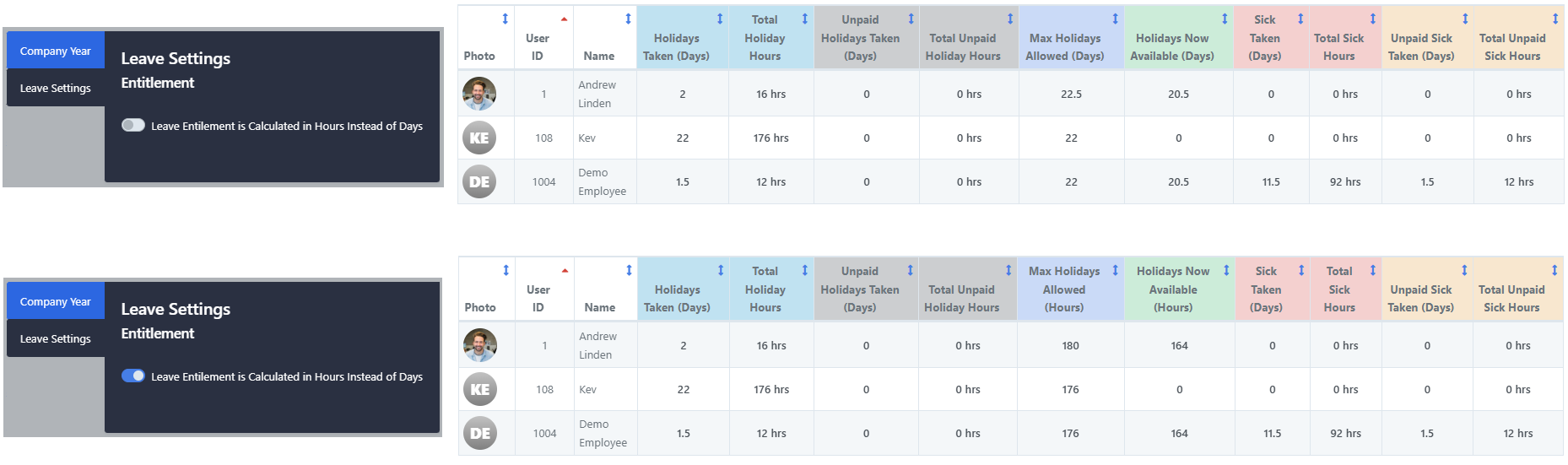
Key Benefits
- Calculate and record employee leave in hours rather than days or half days for greater payroll accuracy.
- Enter each employee's maximum hours holiday allowance directly within their employee profile.
- Easily enable or disable hour-based leave tracking at any time via System Settings.
- View a full overview of leave totals for any given period from the Holiday & Sick menu, under the Leave Reports tab.
- Ideal for businesses with variable shift patterns where leave duration differs between employees.
Schedule – Hide the labour cost column by role
We have added a role permission to show/hide the labour cost column within the schedule.

May 2026
-
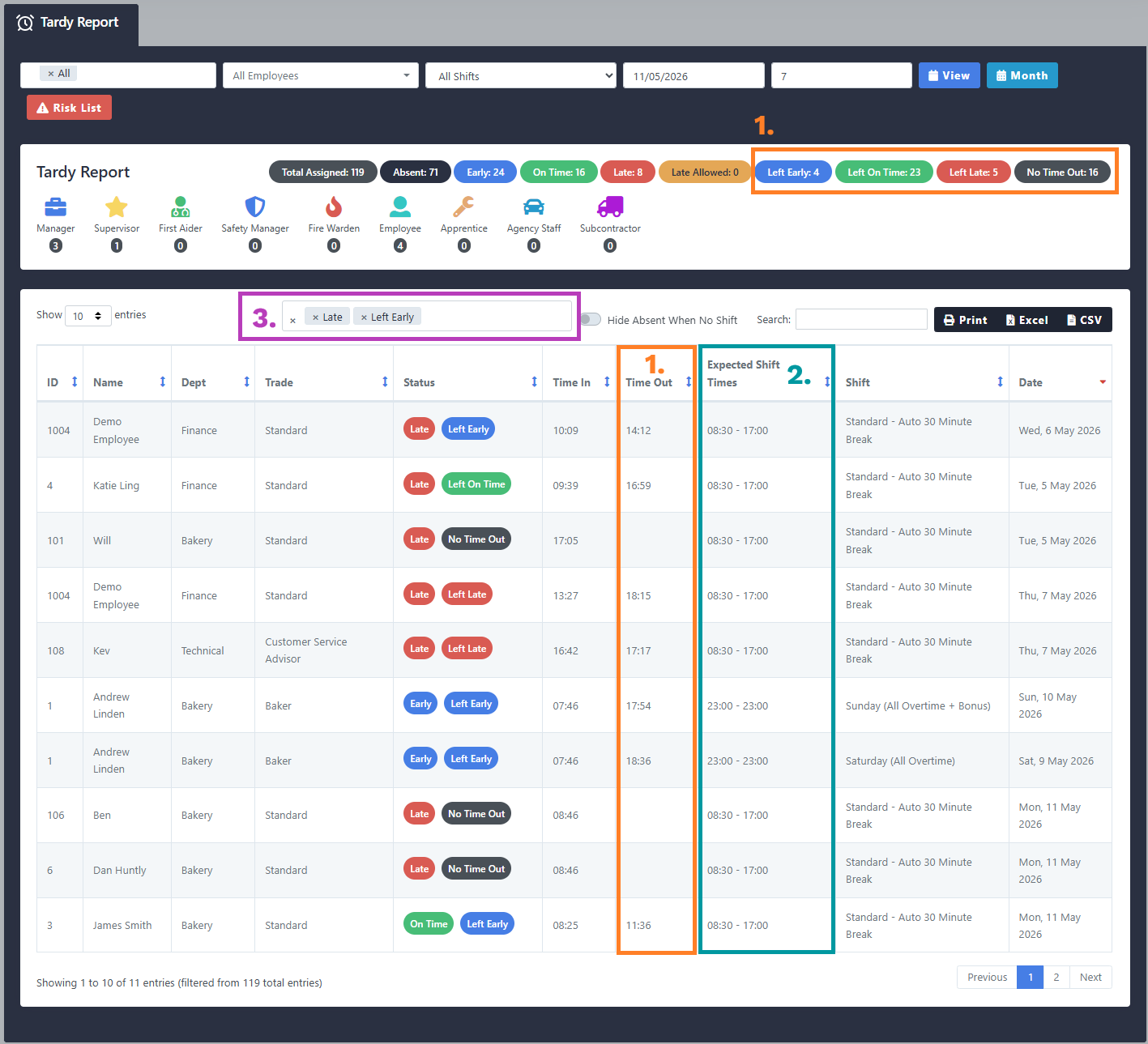
Tardy Report – Updated with new features.
1. You can now track clock-out times via the Tardy Report. Clock-out times can have 4 statuses: 'Left Early', 'Left On Time', 'Left Late' or 'No Time Out'.
2. We have added a new column to the report which shows the expected shift times.
3. The status filter has been updated to support selecting multiple statuses at once.
-
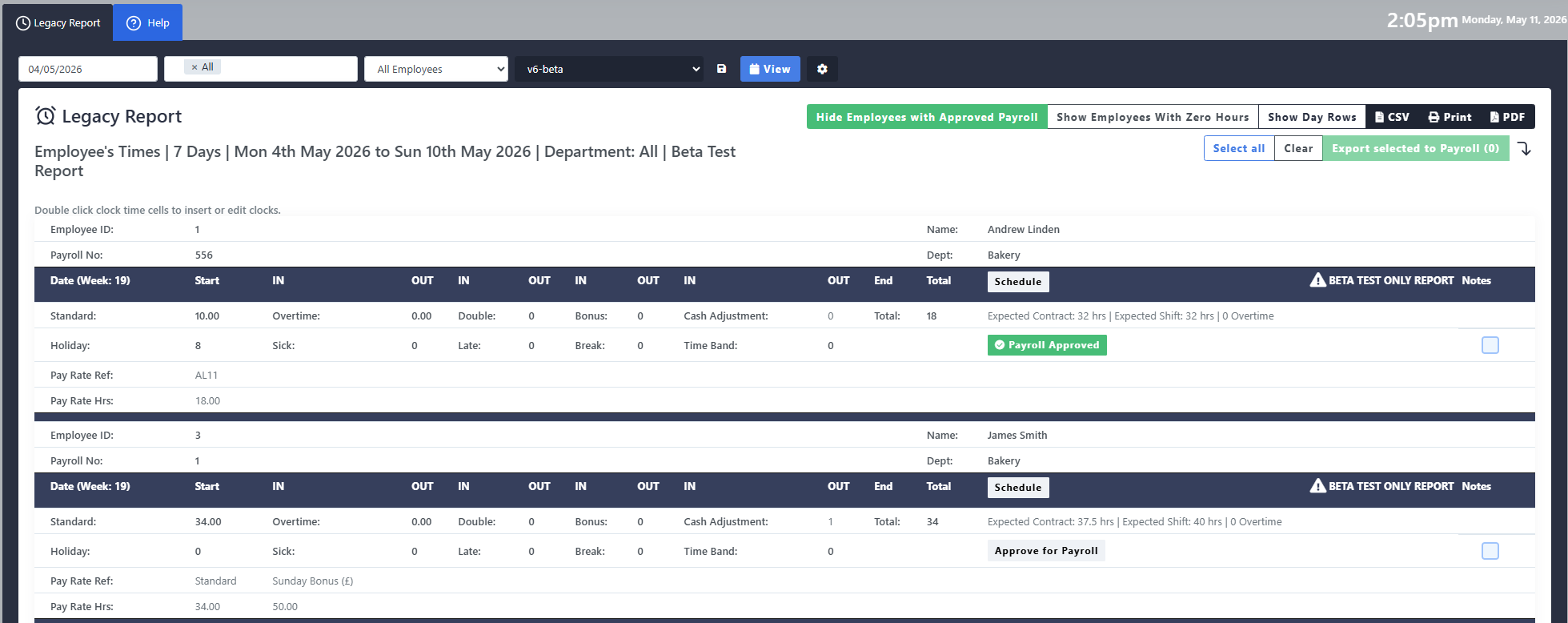
Legacy Timesheet – Hide Approved Timesheets
We have added the option to hide employees whose timesheet has already been approved. This setting can be toggled on/off within the report and can be used in conjunction with the 'hide day rows' feature and 'hide employees with zero hours'. If this option is selected before exporting, these employees will also be hidden on the export.
-
Leave Reports – Leave Requests
We have released a new report for showing 'Leave Requests'. This report will show all requests regardless of status. Allowing you to show 'approved', 'rejected' and 'pending' requests in one place.




April 2026
-
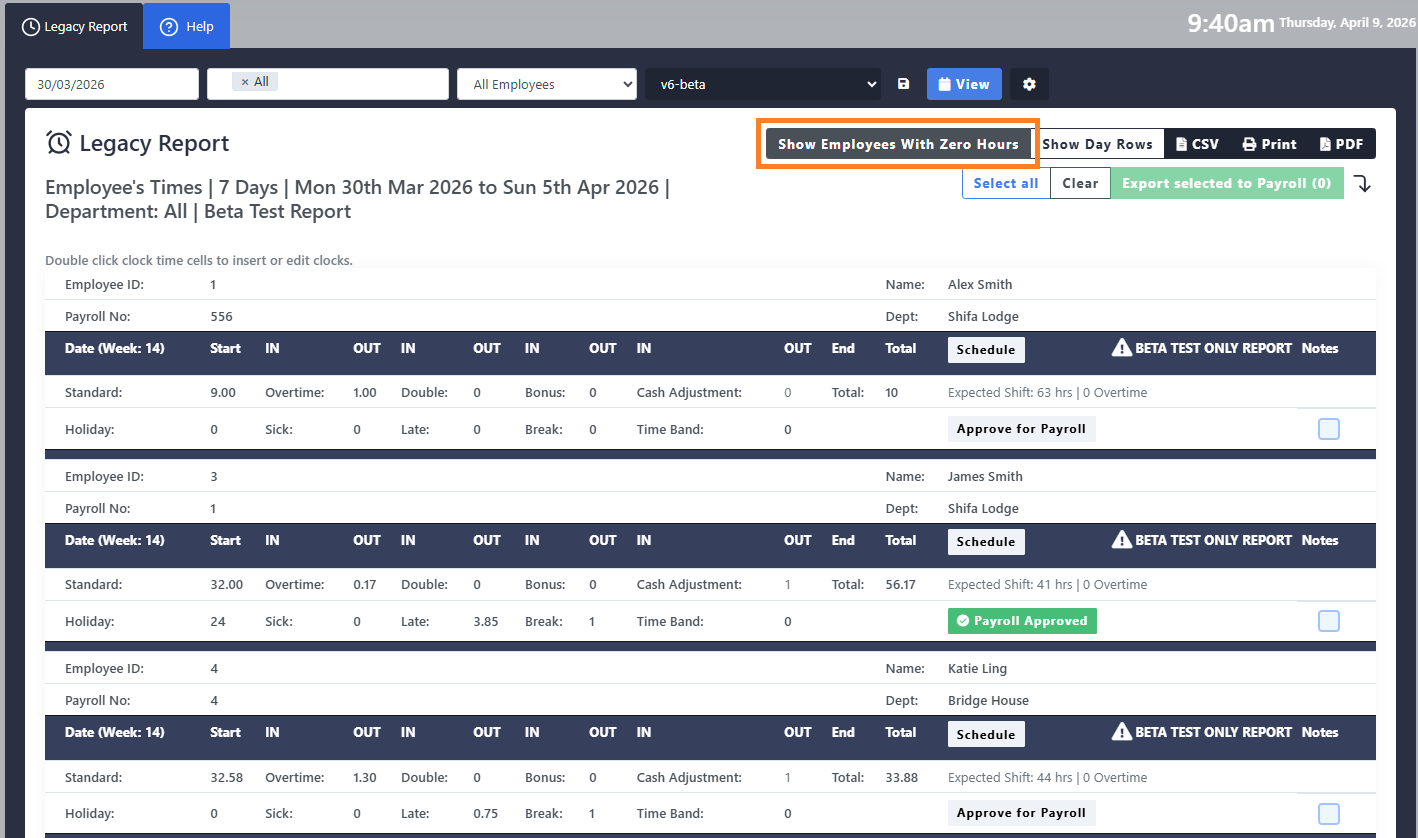
Legacy Timesheet – Hide Timesheets with Zero Hours
We have added the option to hide employees with a total of zero hours. This setting can be toggled on/off within the report and can be used in conjunction with the hide day rows feature. If this option is selected before exporting, these employees will also be hidden on the export.
This feature is available on Legacy Timesheet v6 onwards
-
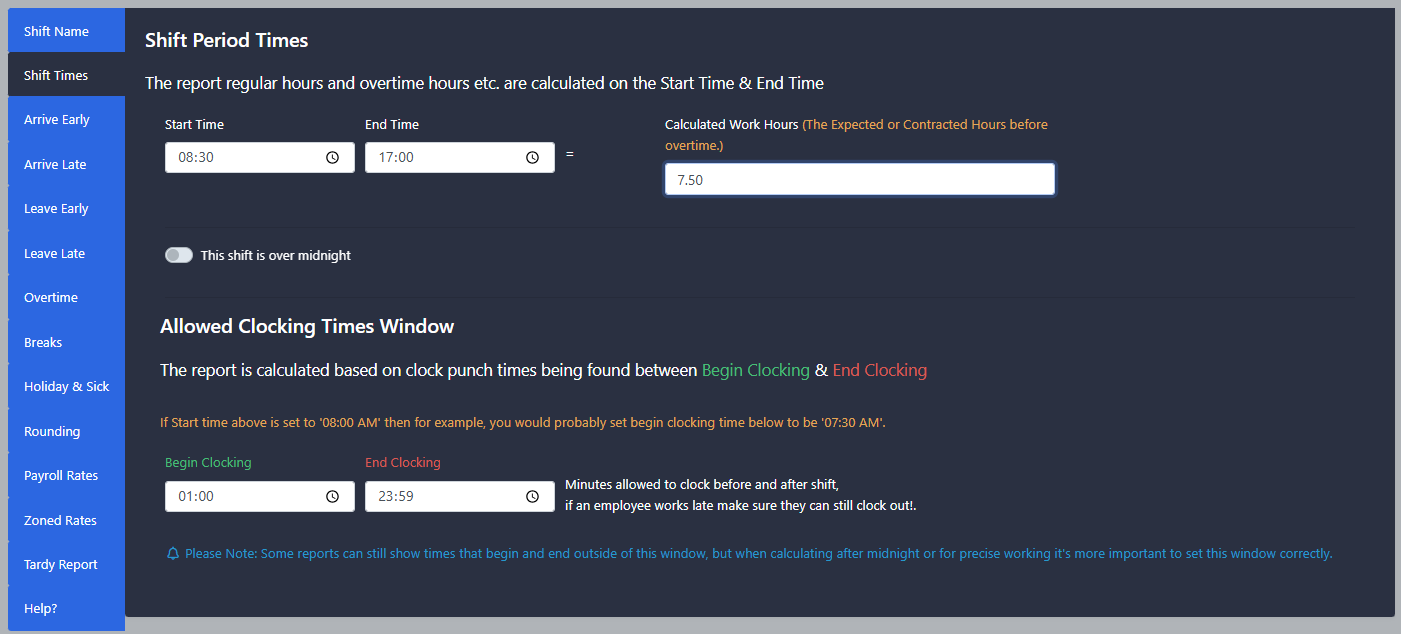
Shifts – The 'Calculated Work Hours' can now be adjusted independently of the shift start and finish times, allowing daily overtime calculations to take into account clocked unpaid breaks. This also allows the schedule planner 'Shift Hours' and 'labour cost' to take unpaid time into account.
March 2026
-
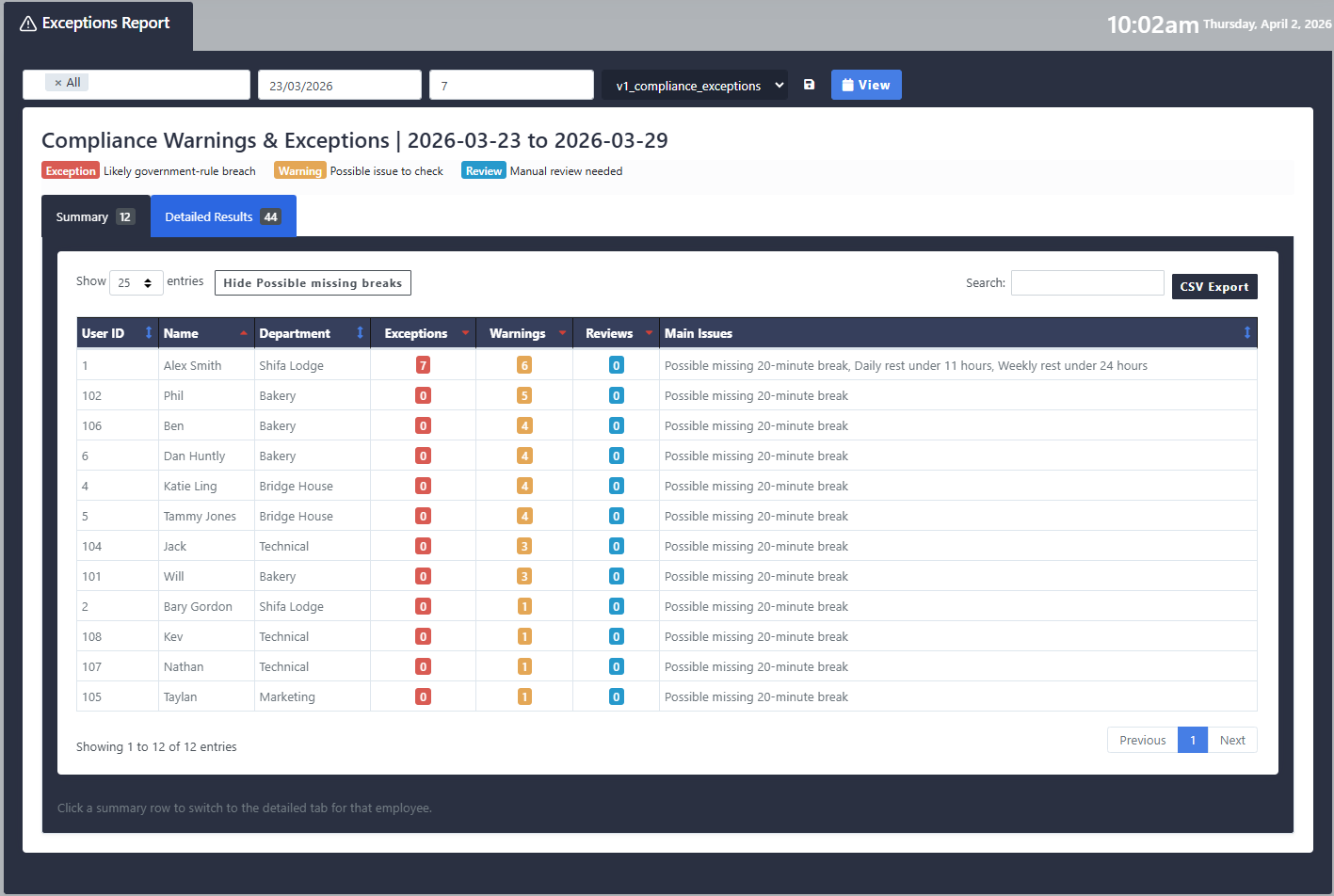
Exceptions Report – We have added a 'Compliance Exceptions' report to the system. This report will display the following working time directive violations:
i. Possible missing 20-minute break
ii. Daily rest under 11 hours
iii. Weekly rest under 24 hours

February 2026
-
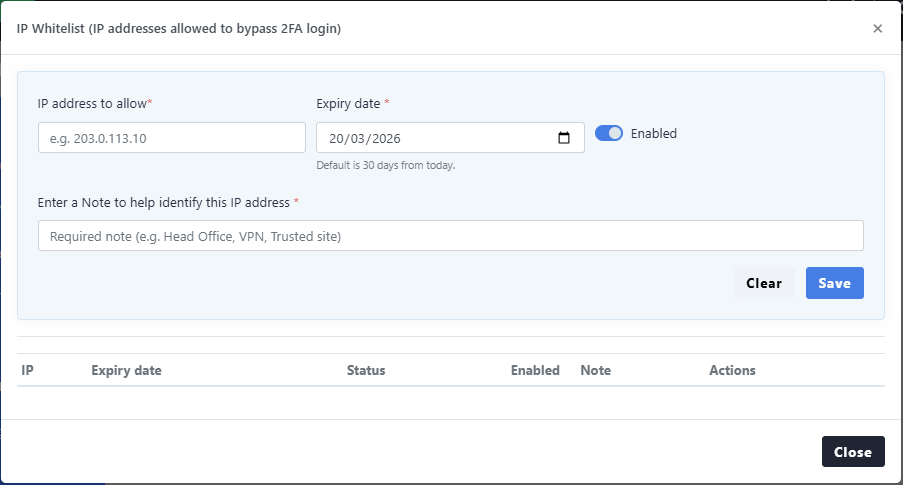
Two Factor Authentication – This function now supports an IP address whitelist. Any whitelisted IP addresses will bypass the 2FA check.
-
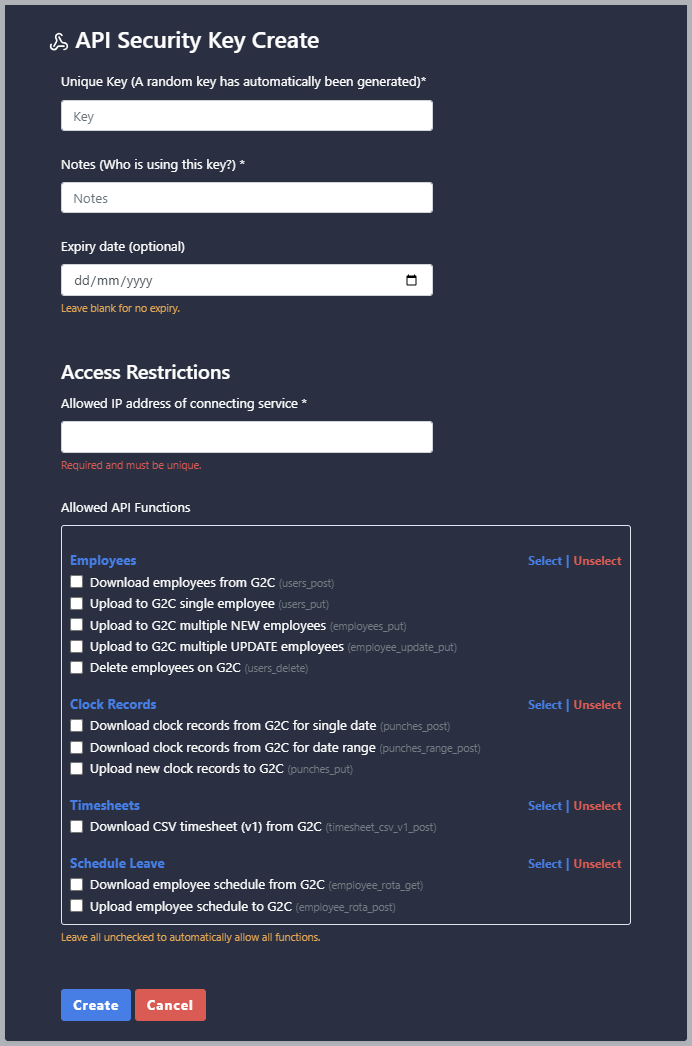
API Access – You can now download and upload schedules via the API. We have also added the ability to set API permissions for each key.
-
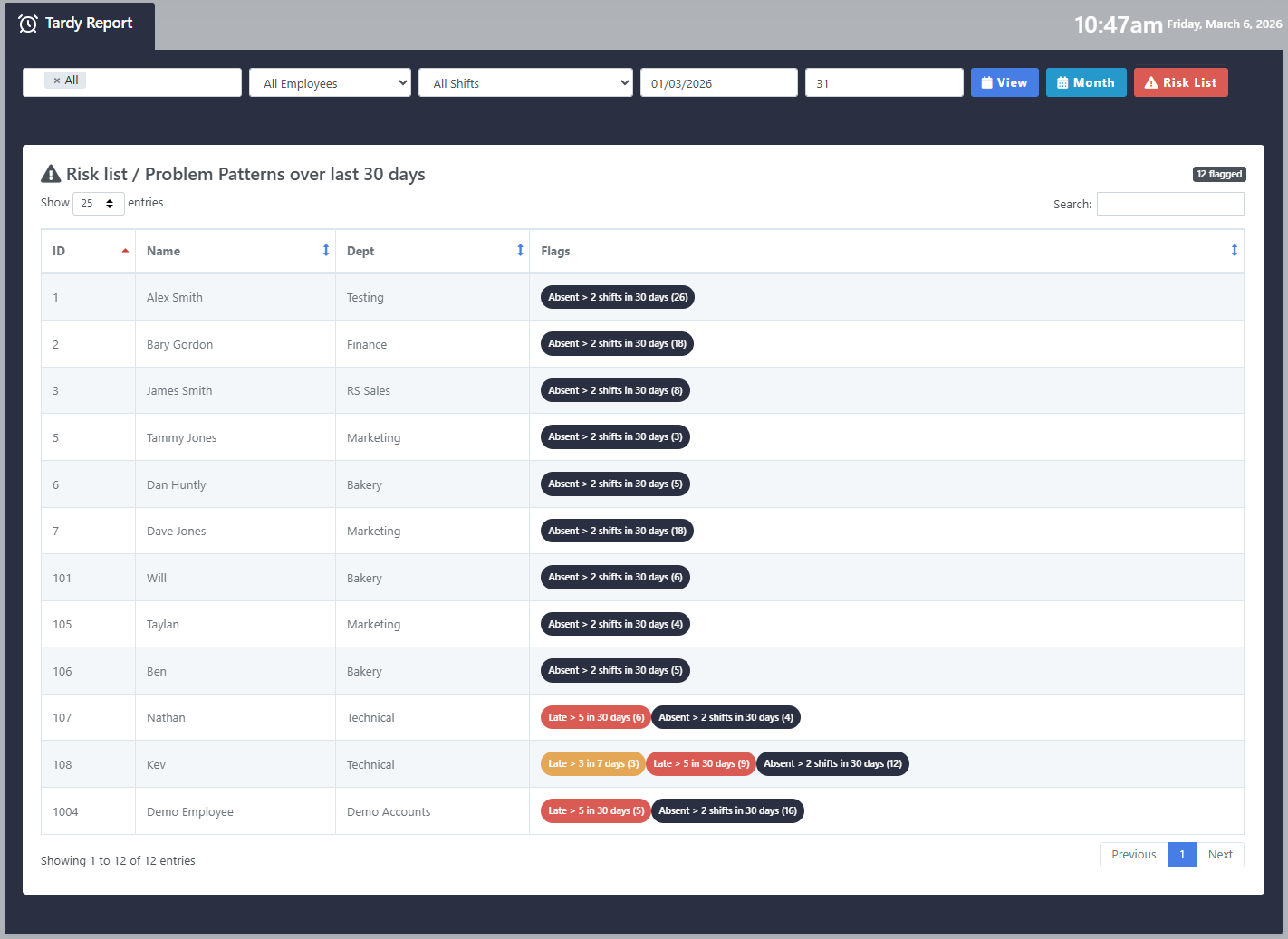
Tardy Report – We have added a 'Risk List' to the Tardy Report to allow managers to easily identify recurring lateness and absence. This list will display the following:
i. Late 3+ times in the last 7 Days
ii. Late 5+ times in the last 30 days
iii. Absent 2+ times in the last 30 days



January 2026
-
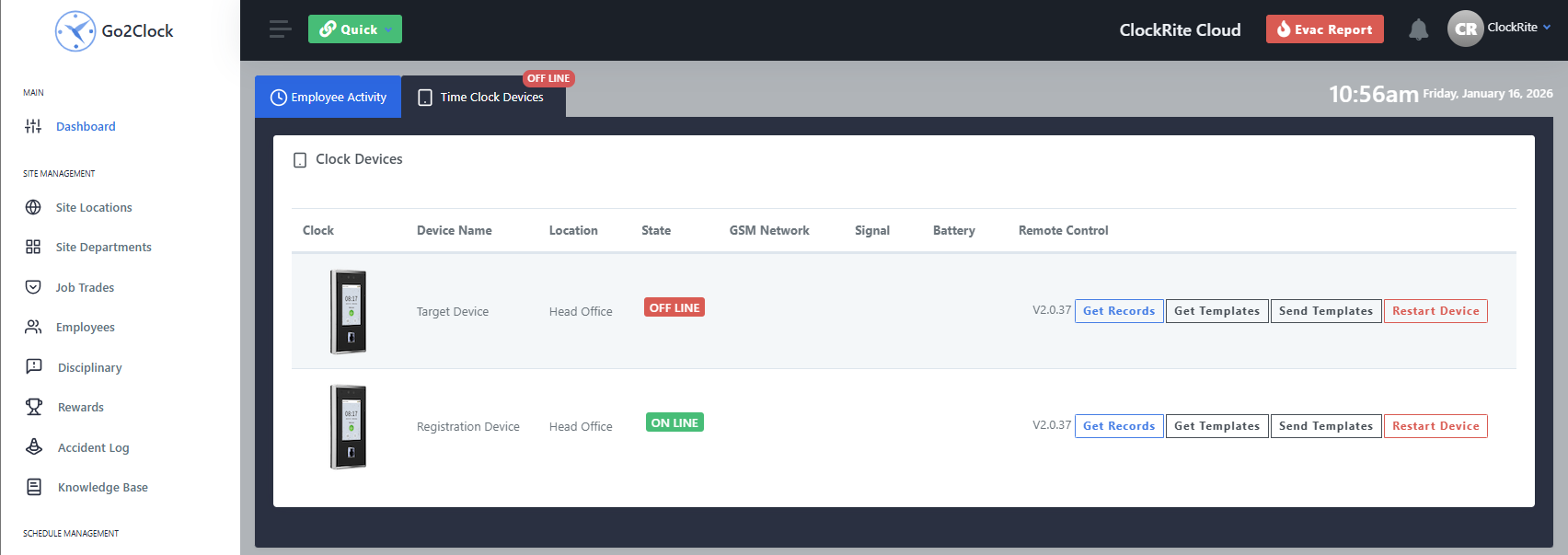
Dashboard Remote Controls – We have added the ability for Full and Limited Dashboard users to Send Templates to the clock from the dashboard. This can be turned on/off for each role by the Super Admin Account under the role customisation settings.
i. Limited Dashboard users have access to get/send templates to the clocks for the first time.
ii. Full Dashboard users have a newer, more convenient way of accessing these options that used to be hidden within the settings.
-
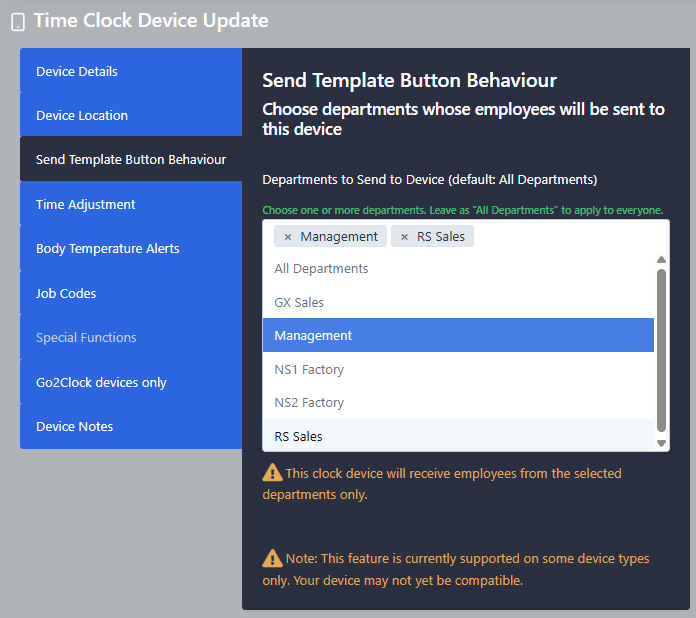
Limit Sending Employees by Department – You can now specify which employees are uploaded to a clock device. Within the device setup you can specify the departments that should be uploaded to the device when clicking the send templates button.
-
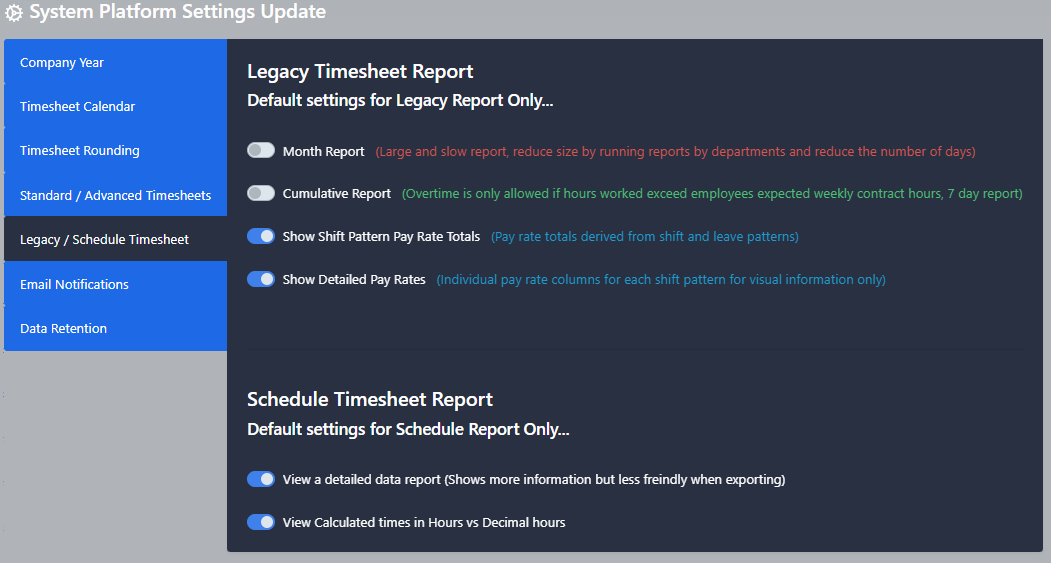
Legacy Report Default Settings – We have added the option to set default settings for the legacy report. These settings can be changed within the system settings tab. This will allow you to ensure the report is run with the correct settings each time.
-
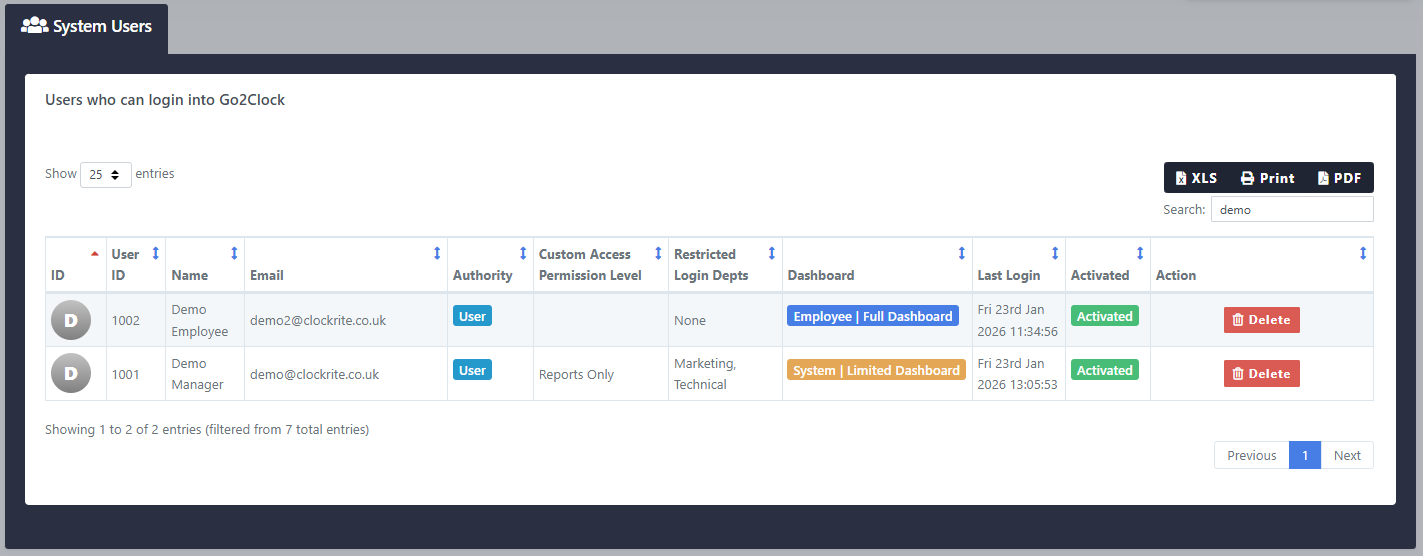
System Users – The system users page has been updated to include details on the custom dashboard level and departments users have been given access to.
-
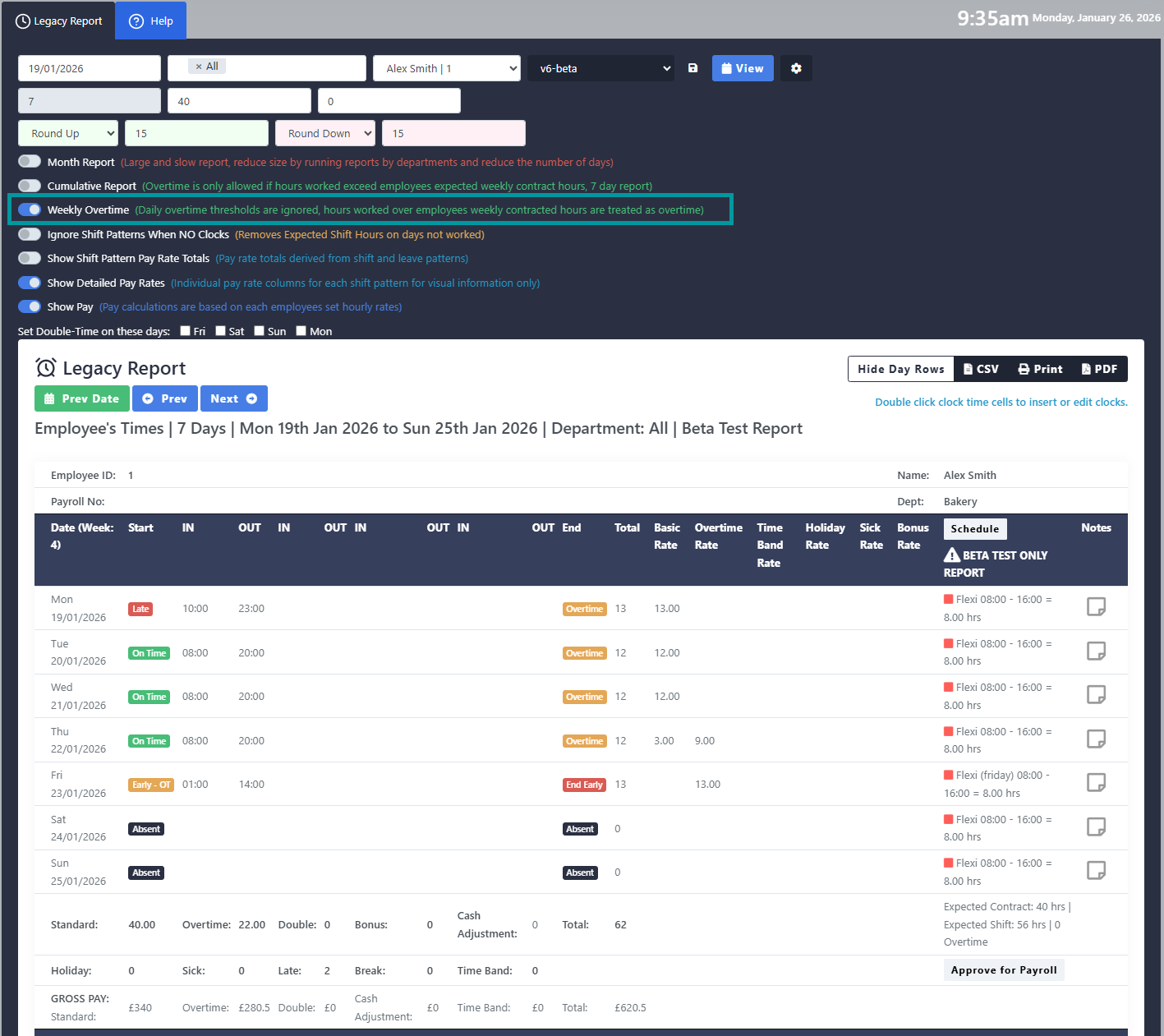
Weekly Overtime Support – Legacy Timesheet V6 onwards has been updated to support weekly overtime calculations.
i. When this option is enabled, any hours worked after the employee's contracted hours will be counted as overtime.
ii. Hours worked within a time band don't count towards this threshold.
iii. Individual shifts can be excluded from weekly overtime calculation.





December 2025
-
Customise Roles – You can now edit the user roles within the system. Customisable options include editing the role name and assigning role permissions. This function is only available for the super admin account.

-
Fire Evac/Roll Call – The Evac Report has been updated to support mobile clockings. To determine which site an employee is clocking in or out from using their mobile device, the system compares the GPS location of the employee’s device with predefined site coordinates. If this is within the radius the clocking will be marked with the site location.
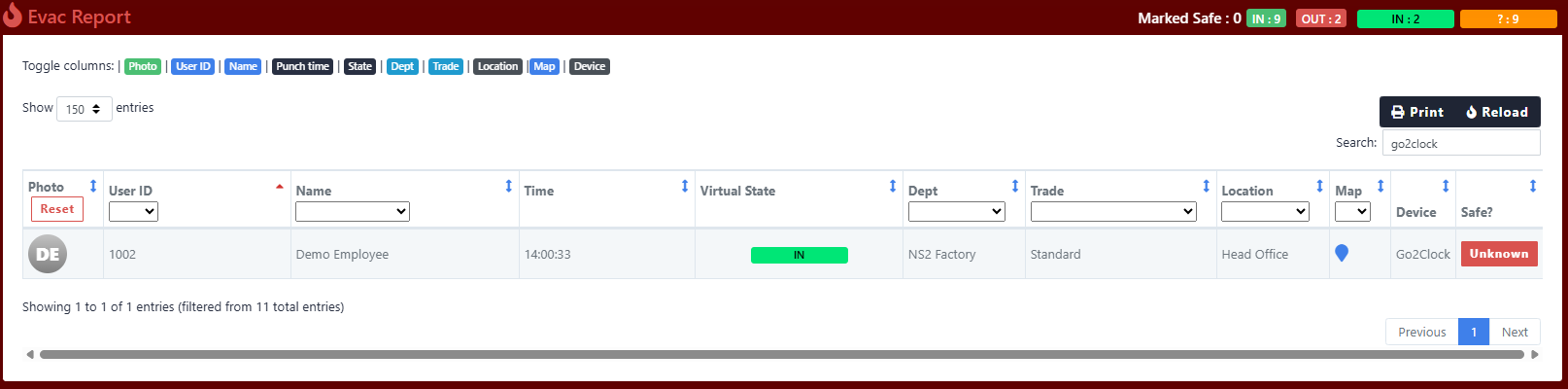
Mobile clocking made within 'Head Office' Geofence 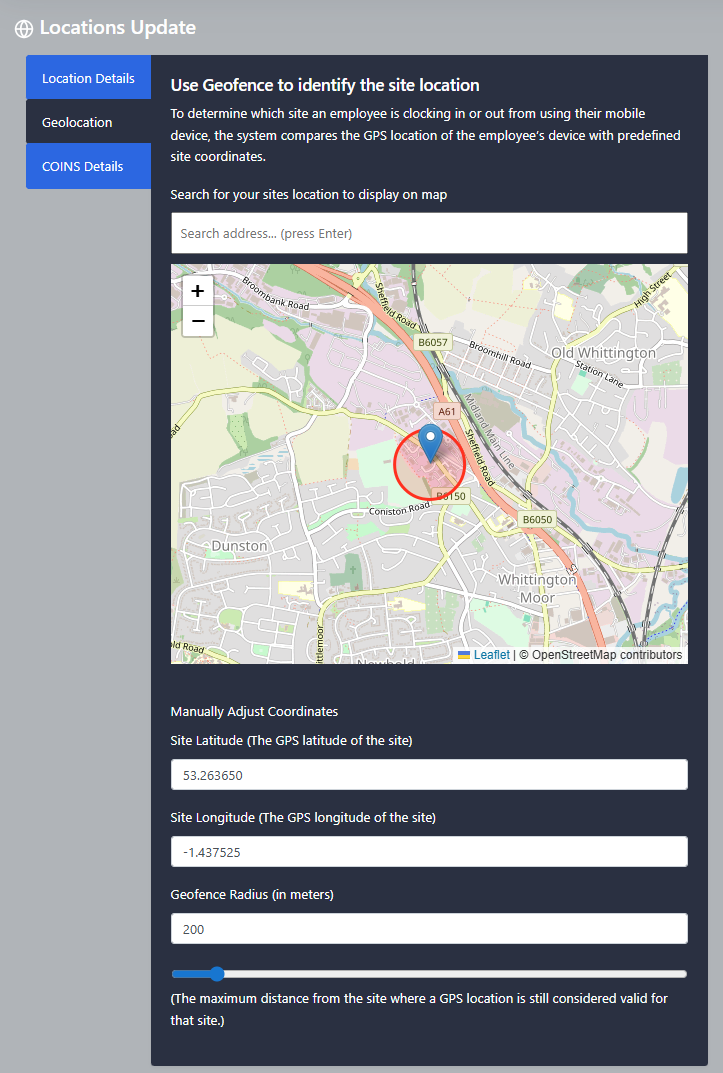
Geofence set for 'Head Office' site location -
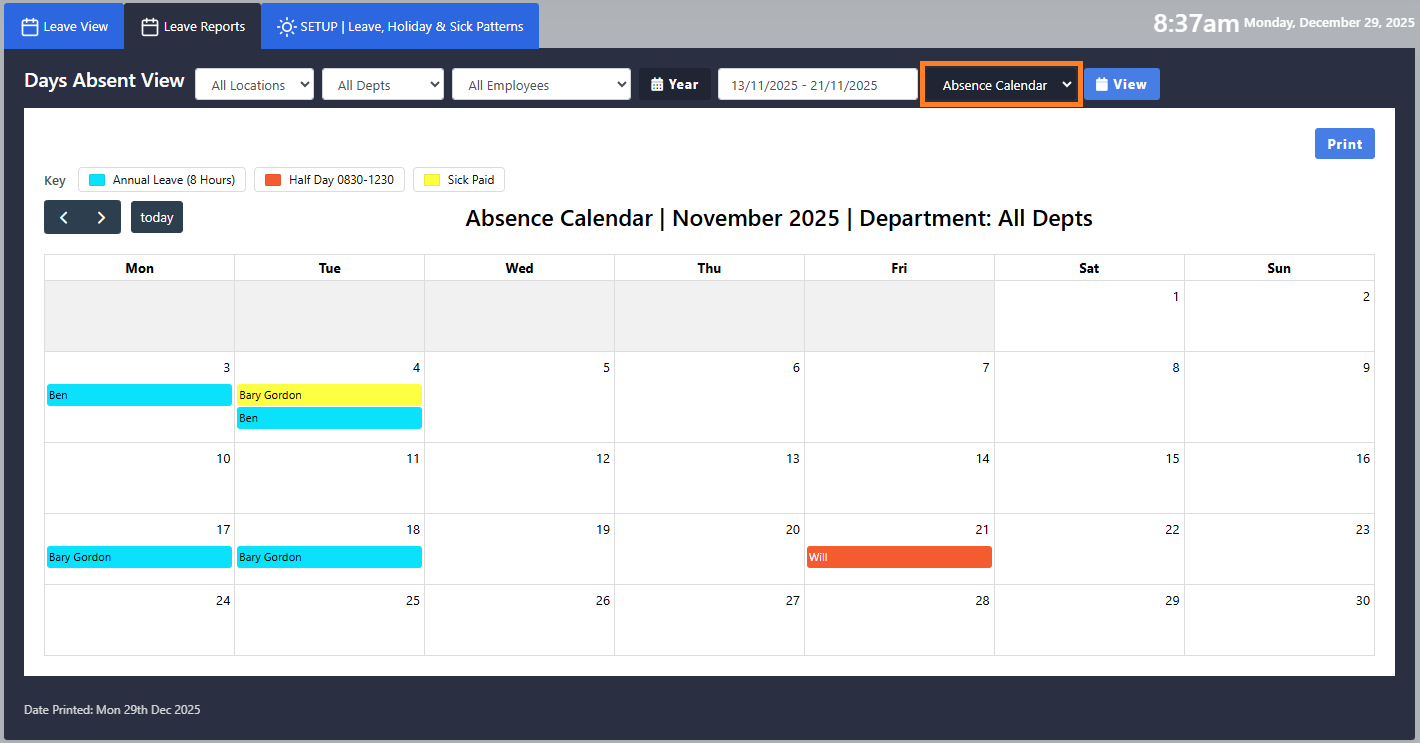
Absence Calendar – New report designed to display holidays and sickness in a calendar view. Ideal for printing to use as a wall chart.
-
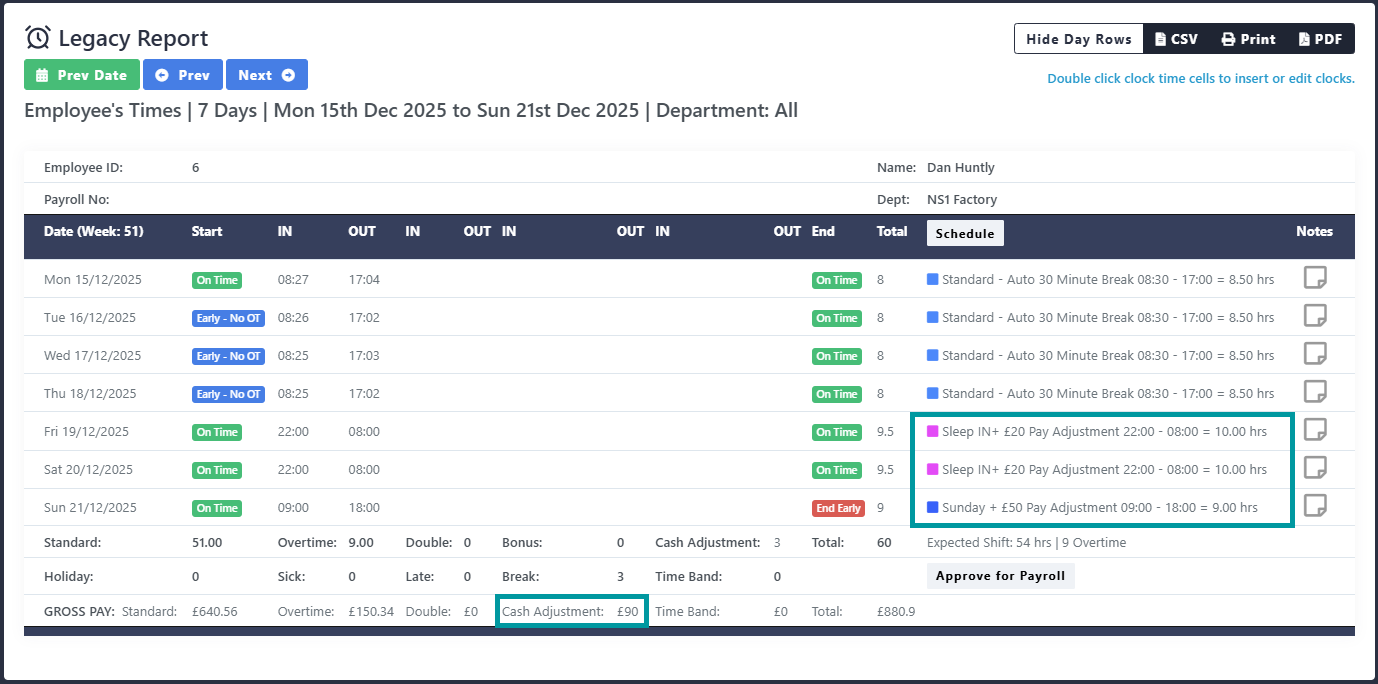
Cash Adjustment – Legacy Timesheet V6 onwards has been updated to support a cash adjustment that is applied from within the shift.





November 2025
-
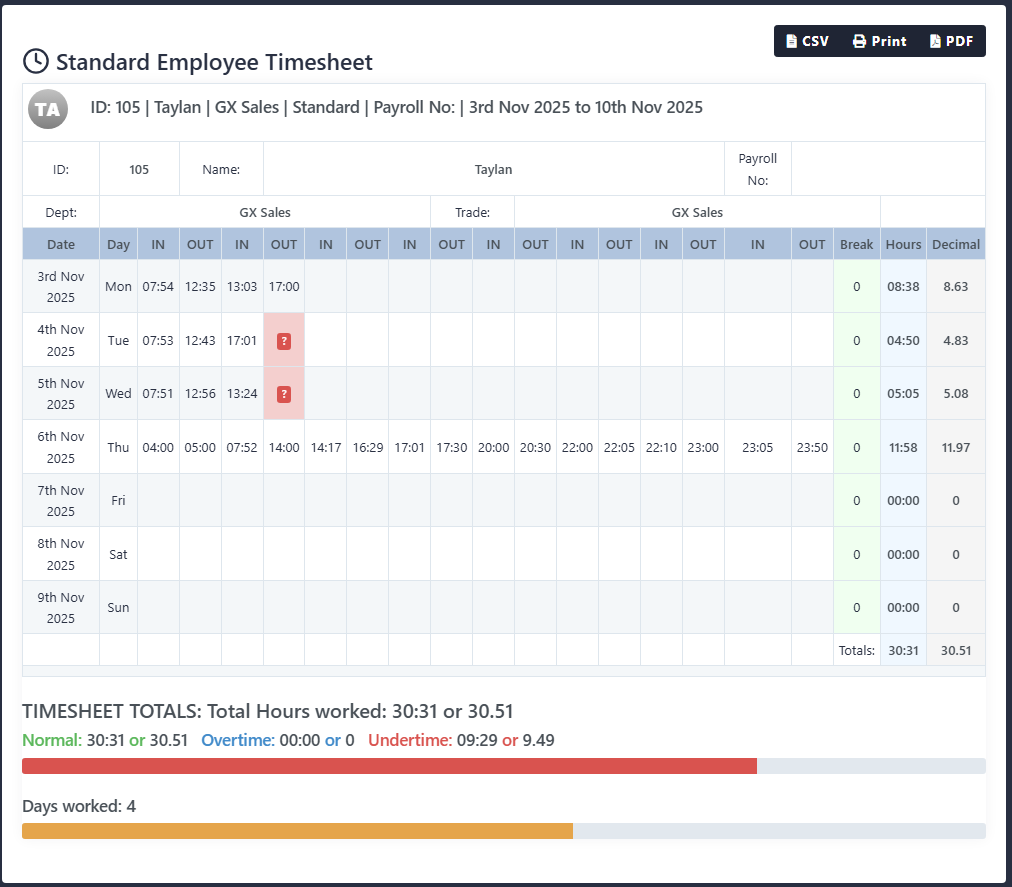
Standard Timesheet – New version released. v2_extended_clocking displays up to 16 clockings per day. Designed for customer who are exceeding the standard 8 clockings.
-
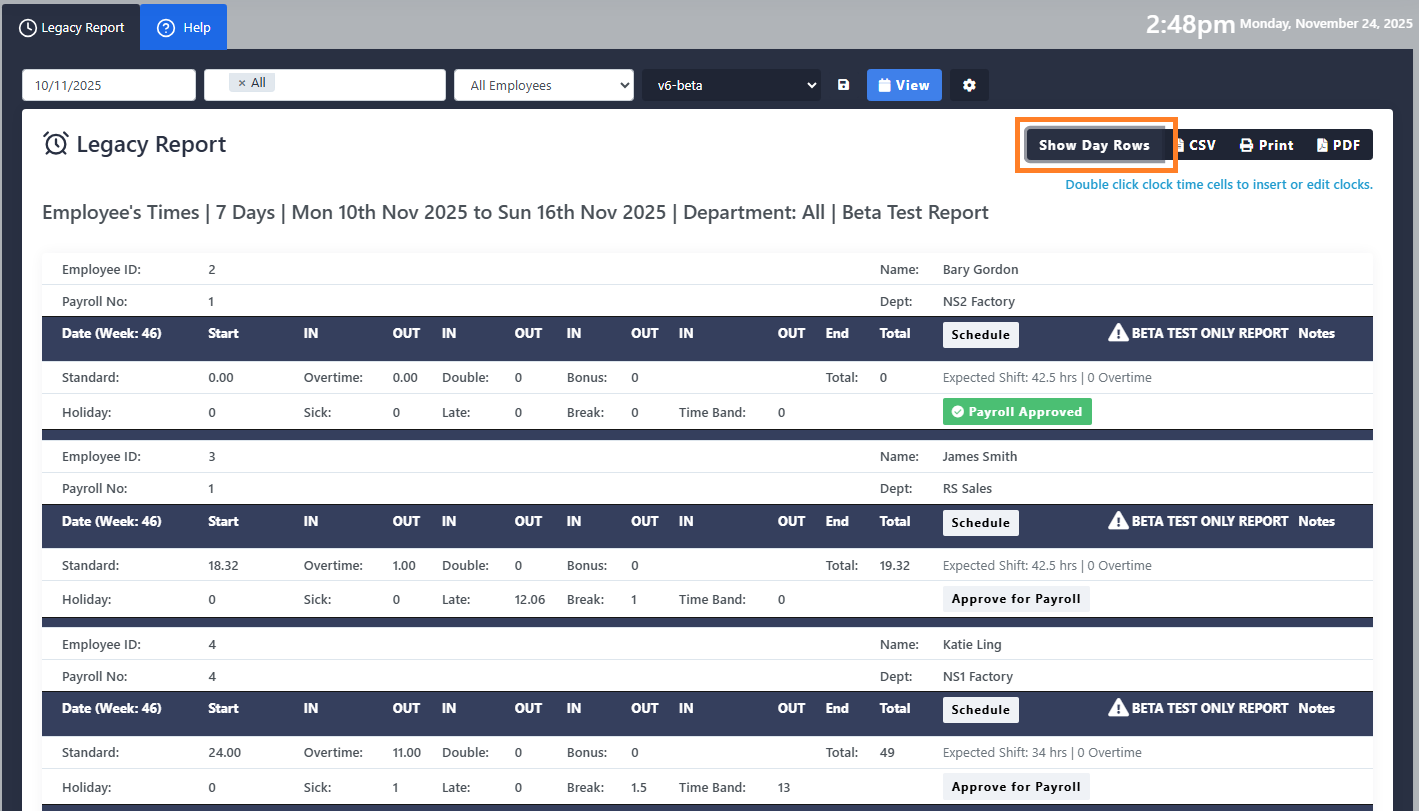
Legacy Timesheet – We have added the option for the legacy report to be summarised. Clicking this option will hide the rows which contain the daily clockings and daily totals. Any additional information that has been enabled such as pay will still be displayed. If this option is selected before exporting this information will also be hidden on the export.
This feature is available on Legacy Timesheet v6 onwards
-
Time Band Support – Legacy Timesheet V6 onwards has been updated to support a time band. The time band is applied within the shift setup. Any hours worked within the time band are not attributed to basic or overtime and are instead calculated at their own rate of pay. Hours worked within the time band also do not contribute towards the daily overtime threshold.






October 2025
-
Directional Grace and Roundings – We have added the option to reverse the rounding direction when a clocking is within the grace period.
This feature is available on Legacy Timesheet v6 onwards

-
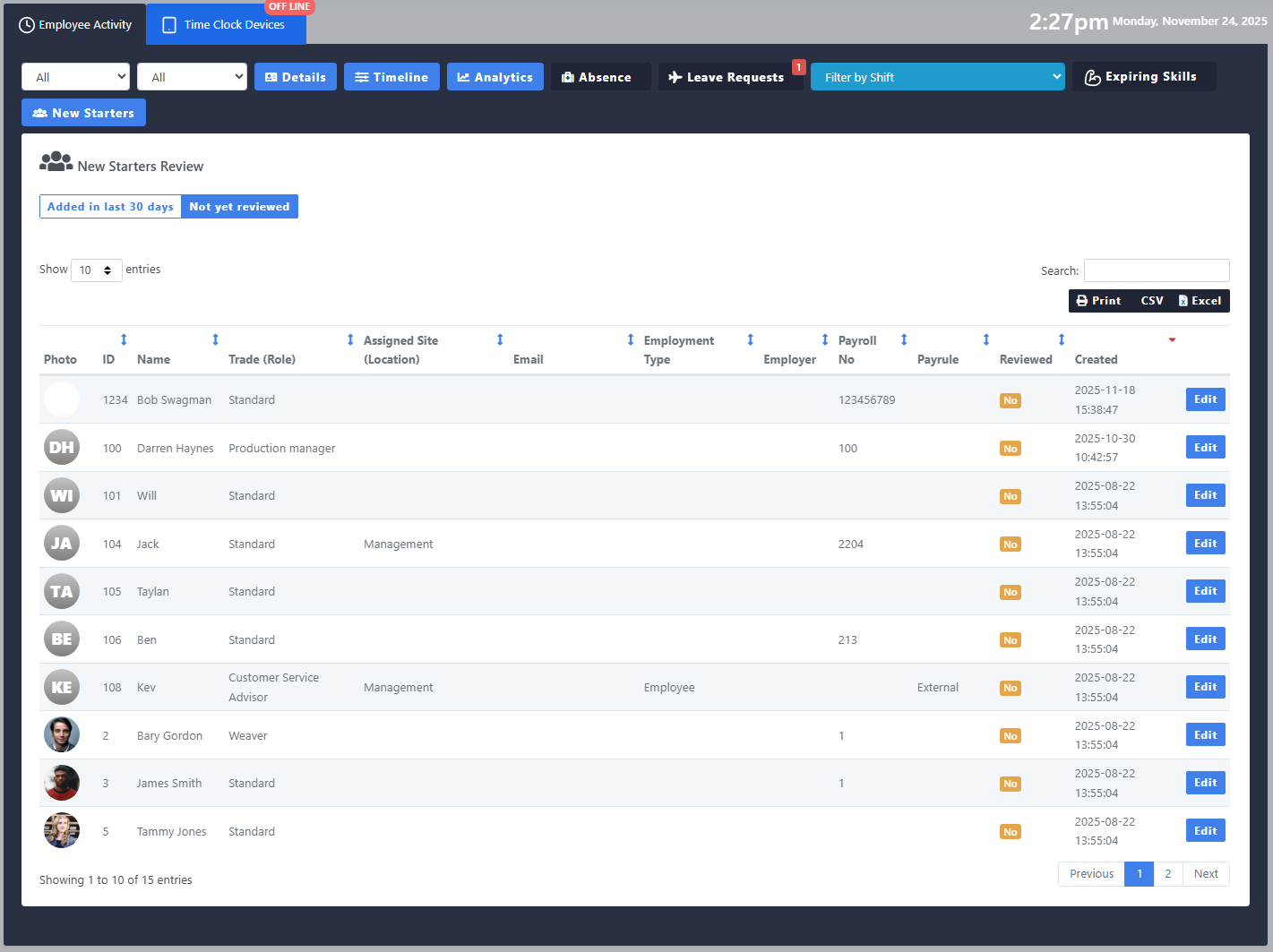
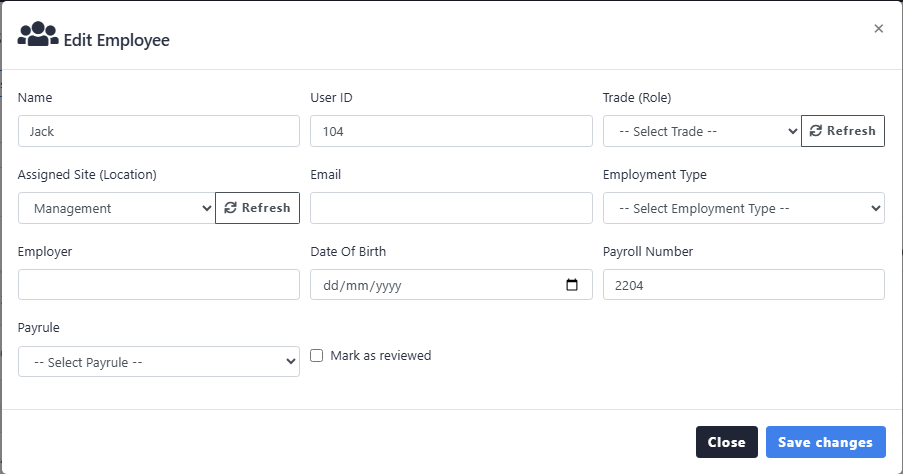
Dashboard – New Starters section added to dashboard to help with onboarding new employees.
-
Schedule Planner – Exports updated to be more user friendly and new export formats added.





September 2025
-
Tardy Report – Updated with new features.
1. Report can now be run for multiple days at a time.
2. Report can be filtered by status.
3. Days with no shift can be excluded from absence reporting

-
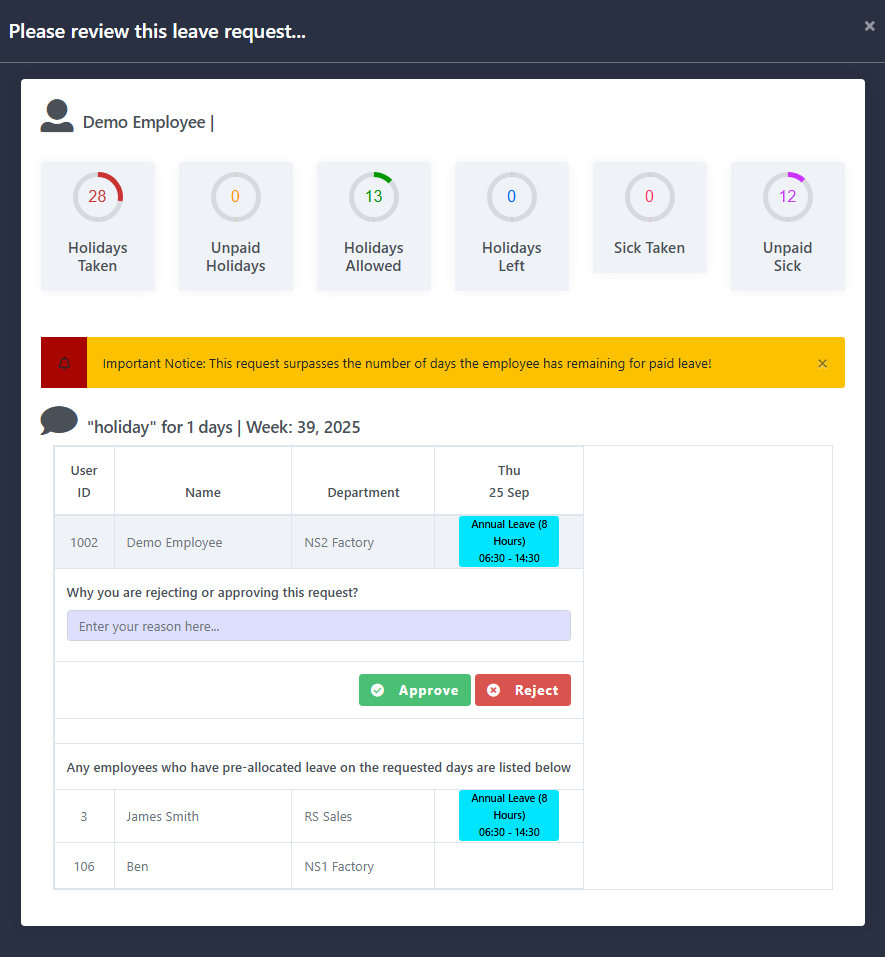
Leave Requests – When reviewing a leave request the system will now show any other employees who have booked the days off at the bottom.
-
Bulk Actions – You can now insert clockings for multiple employees at one from within the employees module.





August 2025
- Legacy Timesheet – Updated to allow approve for payroll when running the report for a calendar month.
-
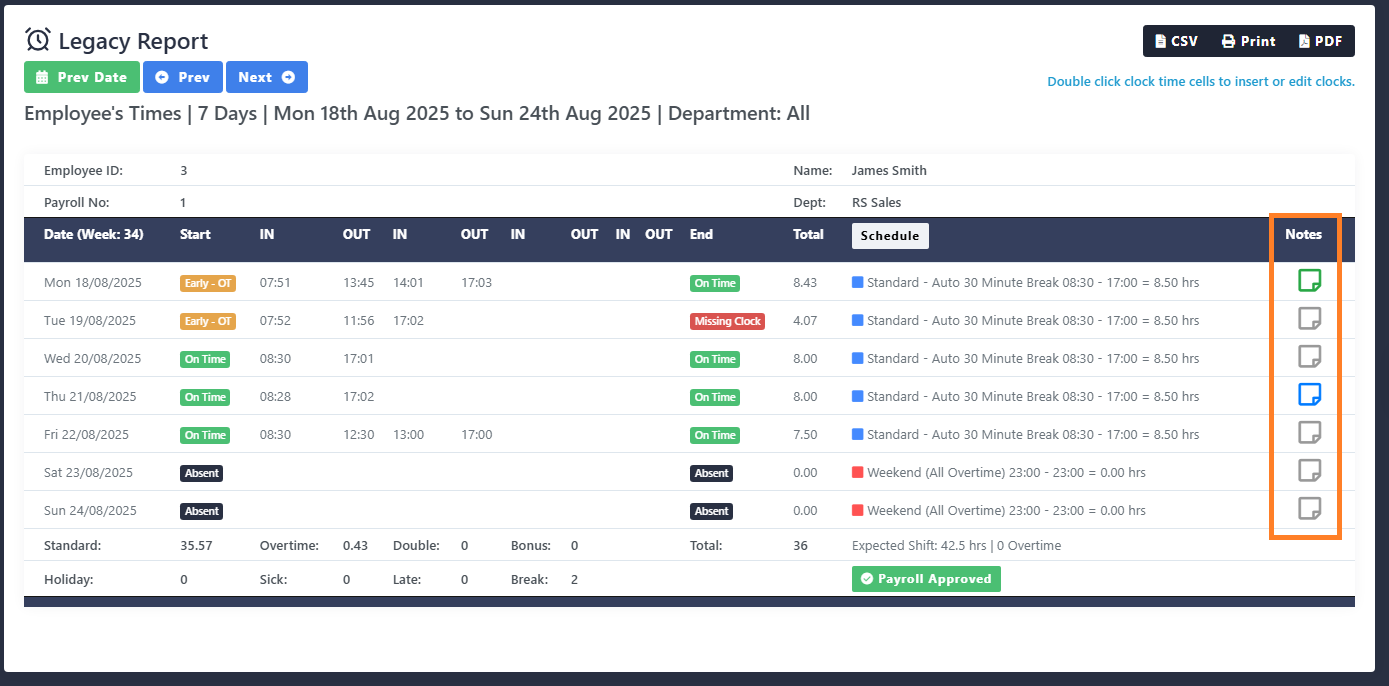
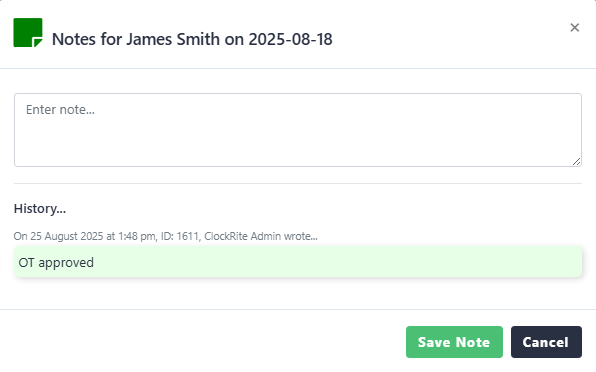
Legacy Timesheet – Notes field added to right of each day. Available from version V5_4 onwards
-
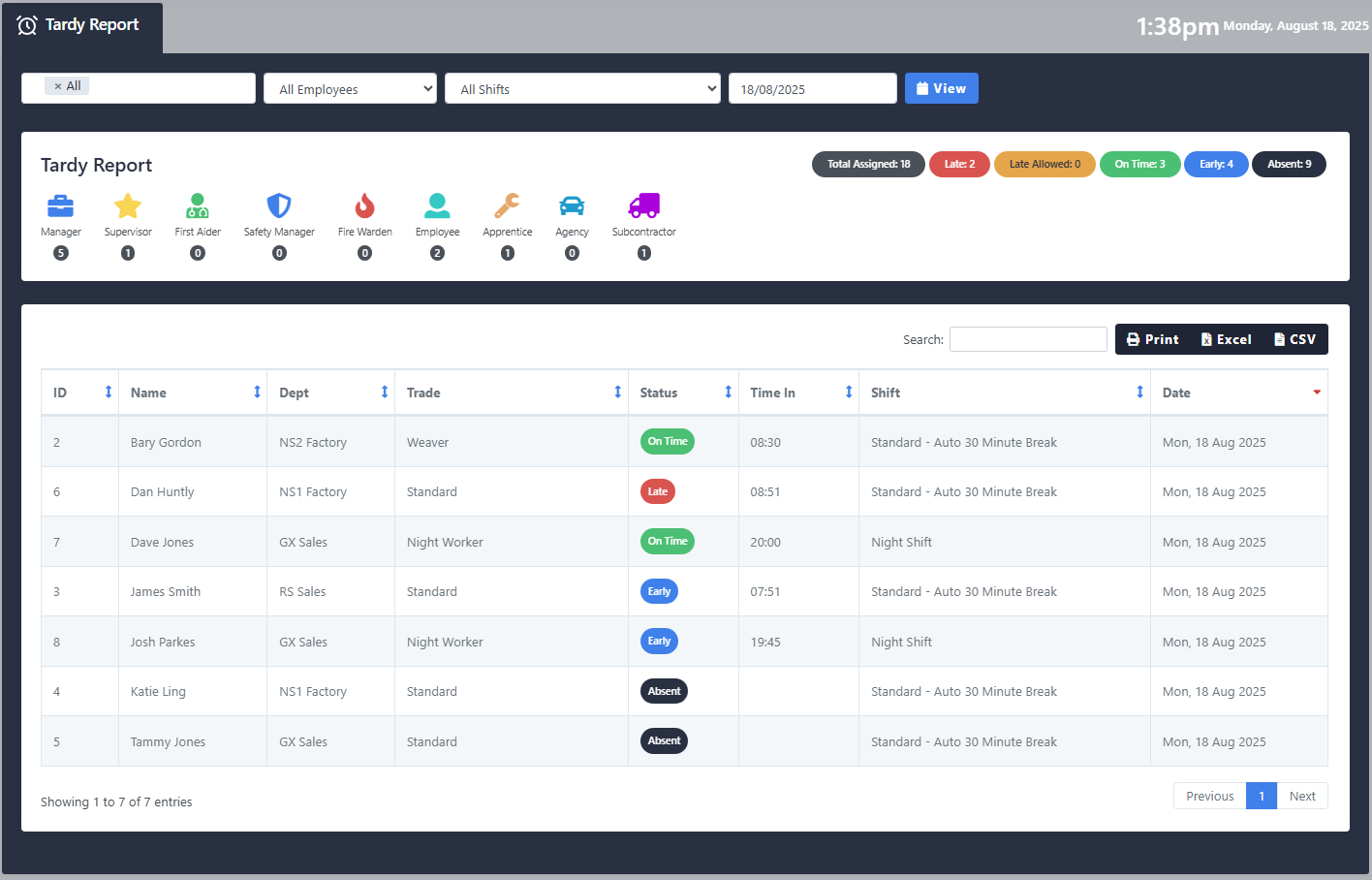
Tardy Report – First release of tardy report. This report allows viewing employees status for a single day.
-
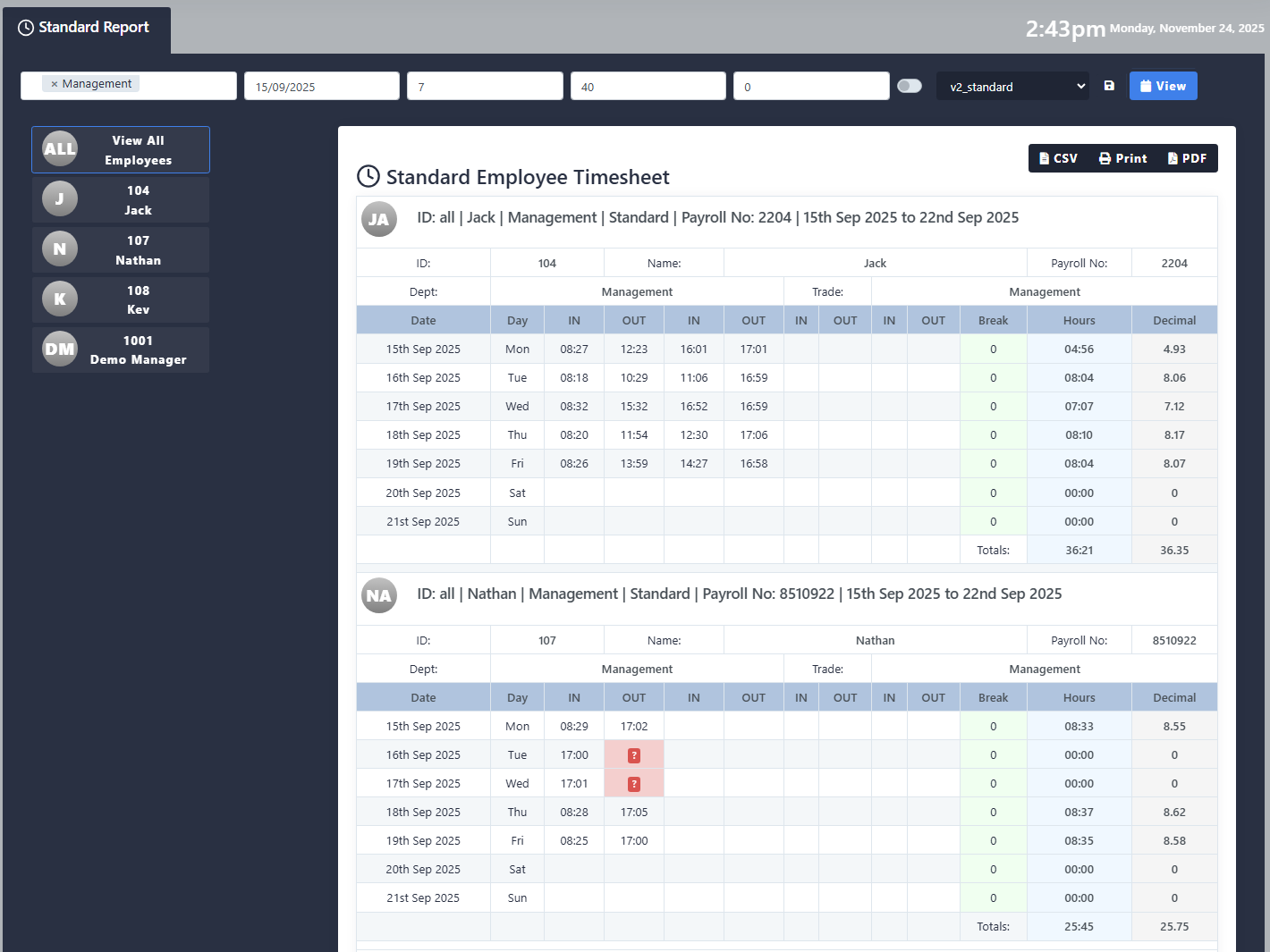
Standard Timesheet – New version v2_Standard, Includes better format and the ability to view all employees within a single report.
-
Access Level Permissions – System users can now have access limited to specific modules. The super admin can create different access levels which can then be assigned to the user logins.

View of existing access levels created 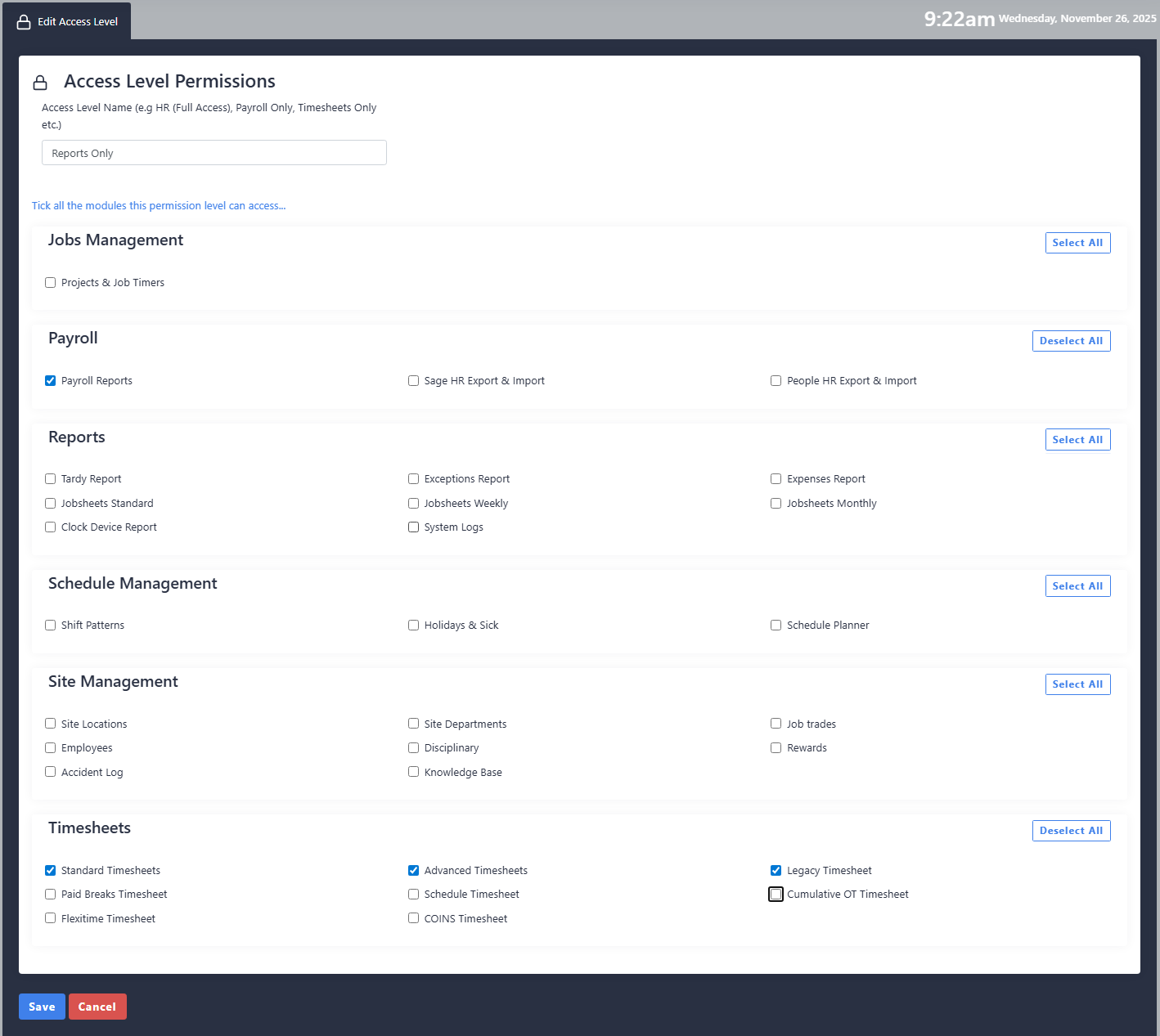
Selection of the modules available 
Assigning access level to user







July 2025
-
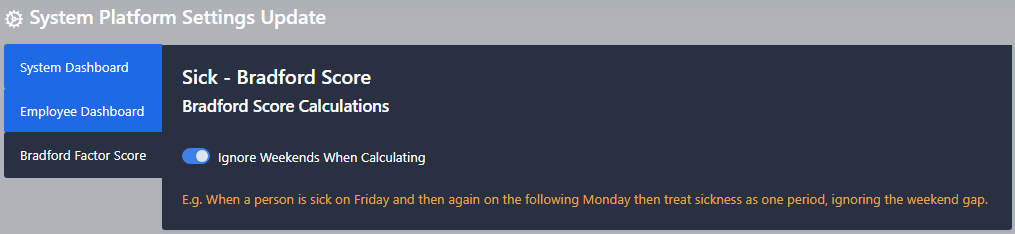
Bradford Factor – Option for weekends to be excluded from score calculation added to settings
-
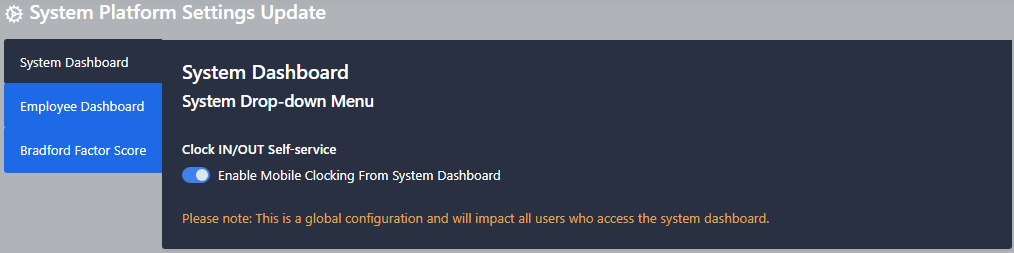
Mobile Clockings – Option to disable mobile clocking for system users added to settings
-
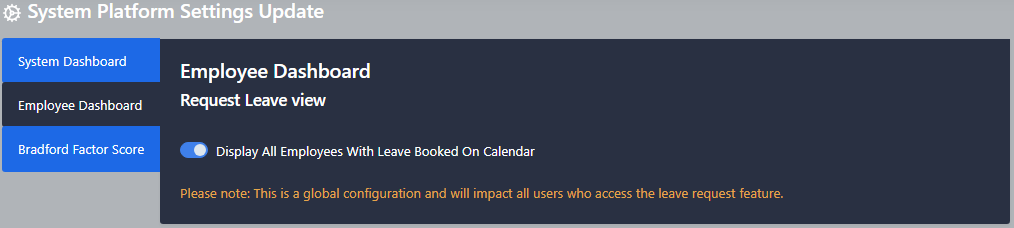
Employee PWA – Option to disable viewing other employees leave added to settings
-
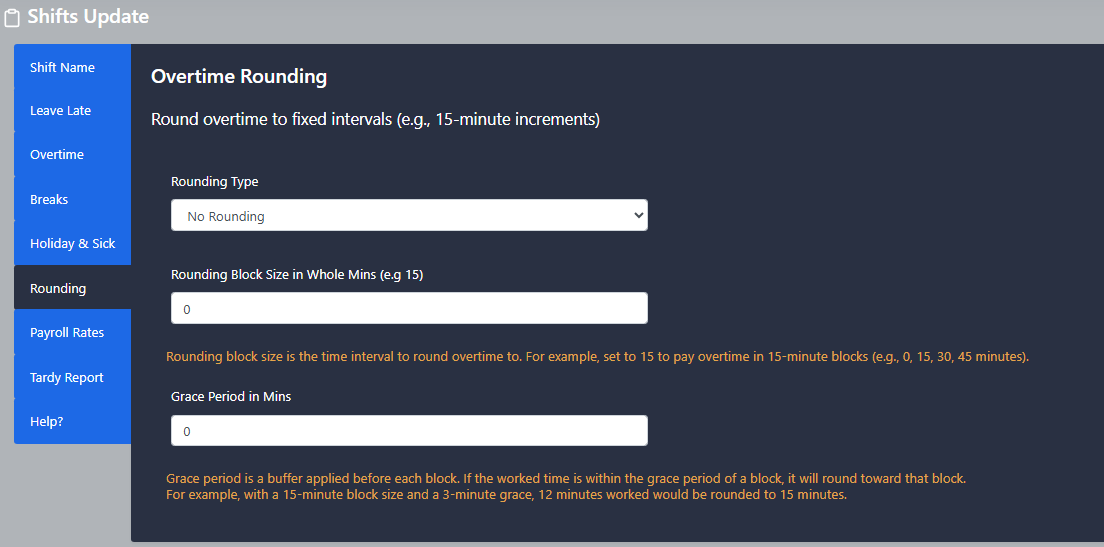
Legacy Timesheet – Option for grace and roundings on overtime calculations added to Legacy Report V5_3-release onwards
-
New Feature – Rewards and Disciplinary sections added to the software. Record and report on employee achievements and warnings.






June 2025
-
Report Update – Reports updated to allow multiple departments to be selected.

- PWA Schedule – Employee Schedule view updated to include days of the week as headings
-
Schedule Planner – Updated to include shift hours and labour cost

-
Employee Status Board – Creation of a new screen that auto refreshes to display the current status of your employees


